US Public Weather
MeteorologyManWeather
3.7289.00 Reviews
- Version
- 2.51
- Installs
- 100.00K
- Age Rating
- Everyone
Screenshots
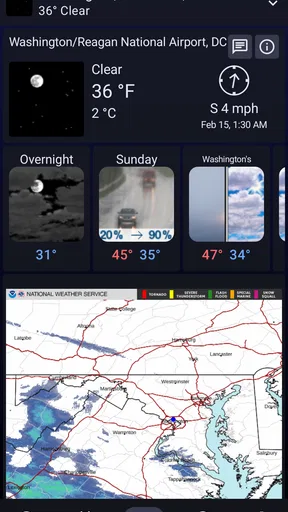
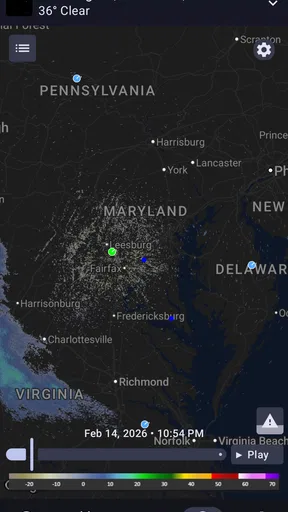
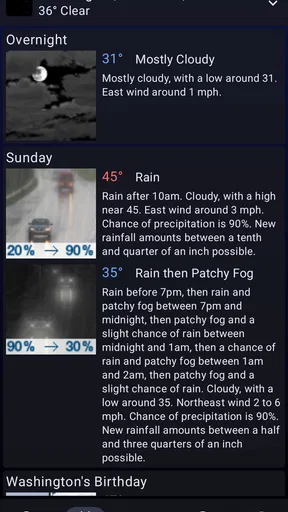
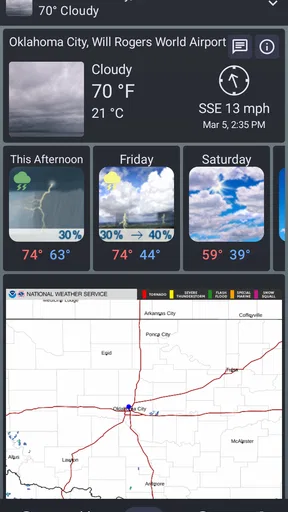
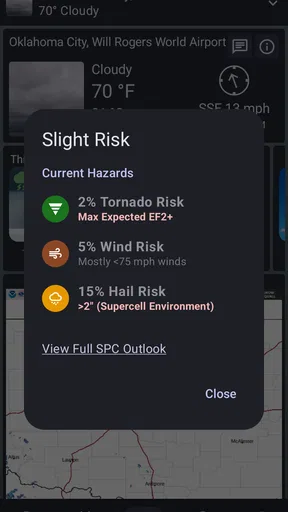
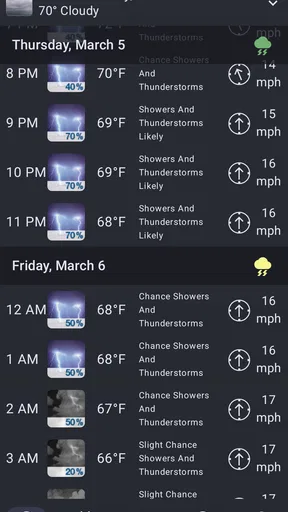
Our Review of US Public Weather
 Analysis by Appyee
Weather apps are easy to judge until several people in the same household need the forecast for different reasons. One person wants to know whether to leave for work with an umbrella, another is checking conditions before driving, and someone else may only need a quick look at severe-weather alerts. I found US Public Weather most useful in that kind of shared routine because it keeps the focus on United States forecasts, alerts, and radar rather than trying to become an all-purpose lifestyle app.
Developed by MeteorologyMan, this free weather app uses National Weather Service data as its foundation. That matters to me because the source is directly relevant to US public forecasts and warnings, especially when an ordinary daily forecast suddenly becomes a safety decision. The app is rated for Everyone, runs on devices using at least Android 11, and its current version is 2.51. It has passed over one hundred thousand installs, with a 3.7 average from roughly four hundred ratings, so it has a real user base but is not universally loved.
I would describe it as a practical tool rather than a polished weather companion. It can fit naturally into a family tablet, a shared phone, or an individual device used by several people, but it works best when everyone understands that the app is a common information source, not a personal account system. That distinction becomes important when different household members have different expectations about saved places, notifications, and privacy.
How it works in a shared household
A realistic example is a weekday morning. I might check the forecast before walking the dog, while another person looks at radar before a commute and a teenager checks whether outdoor plans are sensible. US Public Weather can serve all three needs without requiring each person to use a completely different weather service. The forecast gives the household a common reference point, while radar and alerts add context when conditions are changing.
That shared reference is one of its quieter strengths. When people compare screenshots from unrelated apps, differences in wording, update timing, or visual emphasis can create unnecessary confusion. Using one app for the basic check makes it easier to discuss what is actually happening: whether rain is approaching, whether a warning has been issued, or whether the day simply looks unsettled.
I would not treat that convenience as a substitute for judgment. A radar image can show movement, but it does not automatically tell you whether a particular road, trail, or event venue is safe. I use the app to decide when to investigate further, not to make it the only authority for a serious travel decision. The National Weather Service connection is valuable, but the person reading the alert still needs to understand its location and urgency.
For a shared device, the app has another practical advantage: it is easy to hand over. One person can open the forecast, show the radar, and pass the phone to someone else without explaining a complicated dashboard. That makes it suitable for households where not everyone enjoys learning new interfaces. The trade-off is that a shared screen can also expose whatever location or forecast context the previous user was viewing, so I would avoid treating it like a private personal workspace.
A simple routine that makes the app more useful
I get more value from a weather app when I check it at consistent moments instead of repeatedly refreshing it. With US Public Weather, I would look once before leaving home, once before a planned outdoor activity, and again when an alert appears relevant. This reduces the temptation to overreact to every small change in hourly conditions.
For household coordination, I would make the forecast check part of the plan rather than an argument-ending answer. For example, before a weekend outing, one person can inspect the general forecast, another can look at radar, and the group can decide whether to change the departure time. This is a useful workflow because it separates broad planning from immediate observation. It also prevents the common mistake of looking only at a daily icon while ignoring what is moving toward the area.
A less obvious benefit is that radar can help explain why two people experience the same forecast differently. A day described as rainy may still have a dry window during a commute, while a day that looks mostly clear can contain a short, inconvenient band of rain. I would use that visual context to plan flexible activities, not to promise precise minute-by-minute conditions.
Setup boundaries and device sharing
Before placing this app on a household device, I would decide who the device is really for. A personal phone can be configured around one person’s routine, while a kitchen tablet or family phone needs a more neutral setup. The difference matters because weather information is location-sensitive. A forecast that is perfect for one family member may be irrelevant to another, and switching between places can become a source of mistakes if nobody notices which location is currently displayed.
My advice is to establish one visible habit: say the place name out loud before relying on the forecast. That sounds overly cautious, but it is useful on shared devices where the last person may have checked a different town. It also helps children or older relatives understand that the weather shown is tied to a specific area rather than being a universal household forecast.
I would also keep the app’s role narrow. It is a weather app, not a family calendar, group messaging tool, or household task manager. If several people need to coordinate plans, I would use the weather information here and communicate the decision elsewhere. That separation is healthier than expecting the app to manage responsibilities it was not designed to manage.
There is a cost boundary to remember as well. The app is free to install, but in-app purchases range from ninety-nine cents to nine dollars and ninety-nine cents per item. I would not make a purchase simply because several people use the same device. First, I would confirm that the free experience already covers the household’s actual needs. If a paid item becomes relevant, the person responsible for the device should understand what it changes before approving it, particularly when children can access the screen.
Because the minimum operating-system requirement is Android 11, older household phones and tablets may not be suitable. That is an important practical check before planning to reuse an aging device as a permanent weather station. If the device is compatible, the app’s relatively focused purpose makes it a reasonable candidate for a shared screen. If it is not, no amount of household organization will solve the compatibility problem.
What I would explain to each user
For an adult who wants quick planning information, I would explain that the app is strongest when used as a starting point: check the forecast, inspect radar when timing matters, and read alerts carefully. For a child, I would keep the explanation simpler: the app can show whether conditions may affect plans, but an adult still decides whether an activity goes ahead.
For an older relative, the most important lesson may be not to confuse a normal forecast with an emergency warning. I would encourage them to open the alert details rather than relying only on a color, symbol, or short headline. This is one of the most important household habits because weather apps can make serious information look visually similar to ordinary forecast content.
For a guest using the device, I would recommend checking the displayed location before making a decision. That small boundary prevents a surprisingly common error: someone sees a familiar-looking weather screen and assumes it represents the place they are visiting, even though the previous user left another location open.
Coordination when weather changes plans
US Public Weather is particularly useful when a household needs to coordinate around changing conditions rather than simply satisfy curiosity. Suppose one person is driving, another is waiting at home, and a third is responsible for an outdoor appointment. The driver can use the forecast for broad planning, the person at home can monitor radar, and the organizer can reconsider the timing if an alert affects the destination.
I like this division because it avoids asking one person to interpret every piece of information. It also encourages people to compare the forecast with the actual situation outside. If the sky is already dark and radar shows movement nearby, that combination deserves more attention than a cheerful daily icon viewed hours earlier.
Alerts deserve especially careful handling. I would not forward an alert without its location and timing context. A warning for a nearby area may be highly relevant, while one outside the household’s route may not require a change of plan. The app can bring the information to the screen, but the household still has to decide what it means for its own address, travel path, or activity.
This is where the app compares favorably with the usual basic weather widget. A widget is excellent for a glance, but it often encourages people to stop at the temperature and a simple condition label. US Public Weather is more useful when I need to move from “What is the weather?” to “What is happening around us, and should we adjust our plan?” Its radar and alert focus give it more practical depth than a minimal home-screen display.
On the other hand, a dedicated forecast service may be better for people who want extensive customization, polished long-range planning, or a highly personalized interface. I would also choose a different tool if my main need were international travel, because this app’s identity is clearly centered on US public weather information. It is not the most natural choice for someone who regularly plans across many countries.
Three household workflows worth trying
- The departure check: before leaving, confirm the displayed location, read the current forecast, and use radar if rain timing affects the route.
- The outdoor-plan check: review the broader forecast earlier in the day, then return to radar closer to the activity instead of assuming the morning view remains accurate.
- The alert handoff: when an alert appears, show the full context to the person making the decision rather than summarizing it from memory.
These workflows may sound basic, but they address the main weakness of shared weather apps: people often look at the screen without agreeing on what question they are trying to answer. Is the question about temperature, rain timing, a warning, or travel risk? Once that is clear, the app’s focused tools become easier to use well.
Age, trust, and sensible expectations
The Everyone content rating makes the app suitable for a broad household audience. In practice, that does not mean every weather decision should be delegated to every user. A young person can check whether rain might affect a game, but an adult should interpret serious alerts and decide whether travel or outdoor activity is appropriate.
I also appreciate the trust issue from another angle. Weather information feels objective, yet users can still misunderstand it by reading the wrong place, overlooking timing, or treating probability as certainty. A shared household should teach people to verify the location and read the wording, especially when conditions are severe. That is more valuable than simply telling everyone to “check the app.”
For privacy-minded households, I would keep expectations realistic. A shared weather app is naturally connected to places people care about, so leaving it open on a communal device can reveal where someone is planning to go or which area another person monitors. I would avoid using a family tablet as a private planning tool if that distinction matters. The app can be useful without becoming a record of everyone’s movements.
The developer, MeteorologyMan, has built a focused product rather than a broad social platform. That focus helps keep the experience understandable, but it also means the app should not be judged by standards that belong to family organizers, navigation tools, or messaging services. Its job is to present weather information; coordination happens through the household’s own habits.
The 3.7 average rating suggests a mixed experience, and that feels believable for a utility app whose value depends heavily on device compatibility, interface expectations, and how users interpret weather data. I would not dismiss it because it lacks the polish of a large commercial weather brand, but I also would not assume that every household will find it equally convenient. People who want a highly refined, deeply personalized forecast environment may prefer a more feature-heavy alternative.
My household verdict
After using US Public Weather as a practical planning tool, I see its best role as a shared source for US forecasts, radar, and alerts. It is free to start, suitable for Everyone, and focused enough that a household can build a simple routine around it. The combination of public-weather data and visual radar makes it more useful than a temperature-only glance, particularly when plans depend on changing conditions.
I would recommend it to families, roommates, and shared-device users who want a straightforward way to check local weather without turning the app into a social account. It is also a sensible choice for someone who values National Weather Service information and wants alerts in the same place as the forecast. The strongest users will be those willing to verify the displayed location and read alerts carefully.
I would skip it if you need a richly personalized experience, international coverage as your main priority, or a tool that manages family schedules and communication. I would also be cautious about installing it on an old spare device until checking the Android 11 requirement. Those are not minor details when the app is intended to serve an entire household.
My final advice is to treat the app as a dependable conversation starter, not an automatic decision-maker. Check the place, inspect radar when timing matters, and give alerts their full attention. Used that way, US Public Weather earns its place on a shared device: not because it tries to do everything, but because it gives a household a common, practical view of the weather and leaves the final judgment where it belongs—with the people making the plan.
Verdict
Strengths of US Public Weather
- Provides weather information tailored to locations across the United States.
- Useful forecasts help with planning commutes, trips, and outdoor activities.
- Weather details are presented in a straightforward, easy-to-read format.
- Supports quick access to current conditions and upcoming forecast information.
- Helpful for users who want a dedicated source for U.S. weather updates.
Limitations of US Public Weather
- Coverage may be less useful for users outside the United States.
- Forecast accuracy can vary depending on location and changing conditions.
- Some information may require a stable internet connection to load properly.
- The interface may feel basic compared with feature-rich weather applications.
- Users may still need official alerts for severe or emergency weather situations.
Similar Picks in This Category
View All
Weather - By Xiaomi
Xiaomi Inc.4.1

Weather & Radar Forecast
WetterOnline4.8

Weather
OneLouder Apps4.6

AccuWeather: Weather Radar
AccuWeather3.6

The Weather Channel - Radar
The Weather Channel4.6

1Weather Forecasts & Radar
OneLouder Apps4.3
Frequently Asked Questions
What is US Public Weather, and what information does it provide?
US Public Weather is a weather application focused on delivering essential conditions and forecasts for locations across the United States. After exploring the app, users can generally expect access to current temperature, precipitation information, wind details, weather alerts, and forecast data. Its usefulness depends on the selected location and the availability of local weather sources, so it is best used as a convenient reference rather than a replacement for official emergency notifications.
Does US Public Weather provide severe weather alerts and emergency information?
The app may display weather warnings, watches, or advisories for supported areas, helping users stay informed about storms, heavy rain, extreme temperatures, and other potentially dangerous conditions. However, users should not rely on the app alone during an emergency. Alert coverage, delivery speed, and notification settings can vary, so it is wise to keep official government alerts enabled and follow instructions from local authorities, especially during hurricanes, tornadoes, floods, or wildfires.
Can I use US Public Weather for multiple locations?
US Public Weather is designed to help users check conditions beyond their current location, which can be useful when monitoring weather at home, work, school, or while traveling. Depending on the version and device, you may be able to search for cities or save favorite locations. Before downloading, check the app’s current feature list because the number of saved locations, map options, and location-switching tools may differ between Android and iOS releases.
Does US Public Weather require location access or an internet connection?
The application can usually provide more convenient local forecasts when location access is enabled, since the device can identify where you are and display relevant weather information. You may also be able to search for a place manually if you prefer not to share your location. An internet or mobile-data connection is generally needed to refresh forecasts and alerts, while previously loaded information may remain visible temporarily when you are offline.
Is US Public Weather free to download, and are there privacy considerations?
US Public Weather may be available as a free download, although the exact business model can include advertising, optional purchases, or other limitations depending on the platform and current release. Before installing, review the store listing for in-app purchase details and supported devices. Also check the privacy policy to understand how location data, device information, usage statistics, and notification preferences may be collected, used, or shared.
